Scenario: You've taking a trip (say to San Francisco), your a Lyft customer and have the app on your phone, and on the eve of your leaving you get a pop-up offer on your phone from Lyft. The offer is to buy a "pass" that's good for a month and will give you $5 off every ride for 10 rides during the next 30 days, and 5% off for the 11th ride on. The "pass" cost $4.99, so it's a no brainer, as it will pay for itself on the first ride and could save you $45+, and for some of us, that ain't peanuts. Perhaps this is a coincidence, but when it comes to the internets, not likely. Whether its through data-sharing with the airlines or some other way, it's a virtual certainty Lyft "knew" exactly when and where this person was taking a trip. So, the next time you take pains to "hide yourself" on the internets, you might be "paying" for staying "hidden." Just as we take no position on politics, we take no position, when it comes to the internets, whether it's better to hide or go open kimono.
Wednesday, July 31, 2019


Update Your iOS Device Now
Six serious vulnerabilities have been discovered in iOS. If you have an iPhone or other iOS device, you should immediately update it to iOS 12.4. Just look at The Google for iOS security flaw if you want to learn more about the matter.
Tuesday, July 30, 2019
BBQ Cleaning Recommendation: BBQ Cleaning Guru
If your bbq grill is just ordinary, ignore this post. But, if you have a high-quality grill such as a TEC (or even slightly lesser ones such as Wolf, Dacor, Viking, and Lynx) especially one that is 10 years old or older and then is actually better than the new models which now have much of their components (even key components) made in China, for safety and aesthetic and quality of use reason, you should have it cleaned and, more importantly, refurbished. And that's where the BBQ Cleaning Guru comes in. They're not inexpensive, but they are fantastic, and when you realize what you get for you money, you'll actually consider it money well spent if not a bargain. They are exceedingly professional, timely, efficient, easy to deal with, friendly and pleasant, and accommodating, and they won't make you feel bad or ridicule you in any way for the shape your bbq is in. They pick up on a Monday and deliver your as good or better than as a new one (with new burners if needed, new gas lines, a new regulator, and more) on Friday. Don't be put off my their logo or mascot or whatever the guru picture is supposed to be.
Link to BBQ Guru Cleaning Website
Stopping Robo Calls to Your Cellphone
[Courtesy of cnet which also says: "The best practice is not to answer any robo call]
All four major wireless carriers offer some sort of call blocking feature to customers. Some are free, while others charge for something that should be free.
AT&T's Call Protect app is available for iOS and Android. The free version blocks calls from "likely fraudsters" and labels telemarketing calls. You can add numbers to a block list in the app, as well. The paid version provides caller ID for unknown numbers and offers mobile security features that are unrelated to robocalls. The premium version of Call Protect costs $3.99 per month.
Verizon's Call Filter offers spam detection, spam filter, and the option to report numbers for free. You can pay $2.99 a month (or $7.99 a month for three or more lines of service) for caller ID, spam lookup, and a personal block and spam list. Call Filter is built into most Android devices out of the box (which you've probably been prompted about) but is also available in the App Store for iOS users.
T-Mobile's Scam ID is free to all customers and includes Scam Block. The ID portion of the service will alert you that an incoming call is likely spam, while Block will block the call from ever reaching your phone. You need to activate the Block feature, either through the Scam Block app or by dialing #662# from your phone. You can pay $4 for Name ID to see the names of incoming callers. [Note: TM is actually easier and doesn't need any app: The Likely Scam notice is free, and then highlight the number, click on the three dots in the upper right, and just "Add to Call Reject List"]
Sprint's Premium Caller ID feature costs $3 a month and will identify all incoming callers and block robocalls. There isn't an app to install, the feature is built into "select" phones and the Sprint network.
Monday, July 29, 2019
Best Hope for 2020
Because we don't do politics here, we won't say whether we prefer Trump or the ultimate Dem nominee to win the 2020 presidential election. That said, assuming that the single most important criterion for the Dem nominee is the chance of beating Trump--and nothing else (not brains, not ideology, not ideas, not vision, not character, not nothing) matters, given how the Dem race is developing as each one provides fodder for Trump ads in the general election, and the serious difficulties each of the announced candidates would have viz Trump given the labels (e.g., socialist, radical) each would be tagged with, we will say that the BEST chance for the Dems would be if no one takes the nomination on the first ballot, the convention is thrown open, and Sherrod Brown is named the nominee. Given the party's rule changes now in effect, both in terms of how primary votes are allocated (i.e., proportionately and not on a winner-take-all basis) and the super-delegate system, it could happen. God speed, Sherrod Brown!
Family Business (2019 on Netflix)
Based on watching 1.5 episodes, this looks to be the story of a butcher shop in Paris turning into a cannabis shop. I'm sure there's much more to this than that which you can read about in the link below. It comes highly recommended from a loyal reader who deserves credit for many of his outstanding recommendations including The Wire and Dead to Me and many in between, and even including some he forgot had been recommended to him by us, so you might like it. Alas, some find the characters inherently uninteresting and unlikeable to the point of getting in the way of what could be a good story. Also, it's in French so if you don't speak French it's not easy to read the closed-captioning and following the video.
Sunday, July 28, 2019
Sending Outlook Email Through Public Wi-Fi Networks
If your laptop Outlook emails sent from public wi-fi networks don't get sent, there are three work-arounds:
Easiest: Use Gmail.
Easy: Use your ISP webmail.
Tech-Saviest: Connect your cellphone to the public wi-fi network and"Bluetooth Connect" your laptop to your cellphone; or, tether your laptop to your cellphone and use the data connection of your cellphone.
Saturday, July 27, 2019
Alternative to Impeachment
The following text of a letter was sent to the Failing NYT. You'll likely see the idea in one or more of its columnists or editorial writers:
"No one disputes that: Given the Senate, impeachment cannot lead to removal of Trump from office; and proceeding with impeachment will fracture the Democratic House and could lead to the Republicans taking back the House. Likewise, no one (except his base and those who say they belong to the Republican party) disputes that Trump has violated his oath of office, committed crimes, and has corrupted the office--in addition to the other harms he has inflicted on the country, our democracy, our allies, and the planet. So, if the House Democrats want to do something, do this: Pass a resolution that sets out Trump’s derelictions and wrong-doings, and states its wish to have a president who will abide the oath of office, and not engage in criminal conduct. This won’t remove the president, but it will rebuke him as much as would articles of impeachment while not splintering the House Democrats. And in the meantime, it takes the impeachment issue, and the rancor and divisiveness along with it, off the table, and lets the Democrats move on to doing everything possible in a unified way to have Trump thrown out in 2020. And if they cannot pass such a resolution, why is impeachment even in any conversation."
Friday, July 26, 2019
New Sour Cream Squeeze Packaging
As many others do in switching to gazpacho instead of a plain salad as a first course during summer, we have been clamoring for the sour cream makers to go to a squeeze dispenser much like ketchup, mayo, and mustard have long done. We are pleased to report, as we know you will be pleased to hear, that our efforts have paid off: Sour cream now comes in a squeeze tube. Is this a great country or what?

How the 2020 Presidential Election Will Be Decided
After an exhaustive analysis, we have just published our Election Analytic Report (EAR) for the 2020 presidential election, and here is the Executive Summary from what The Ear heard and concluded:
1. Forget all the polls.
2. Forget all the fancy-dancy electoral college analyses.
3. Forget who the Dem candidate is.
4. Forget how much money is raised by each candidate or spent on ads and such.
5. Forget how the candidates do in the debates.
6. Forget everything each candidate says, including any gaffes or stirring statements.
Here is what will determine the outcome: Given Trump's and the Republicans' track record and continuing efforts to be sure no legislation is passed nor anything else done to impede, much less block, foreign efforts to effect the outcome, the winner will be determined by whether Russia and Saudi Arabia and others on their side or Iran and others on its side will do a better job in their respective "electoral efforts."
Outlook Help From Microsoft
If you have Outlook 365, and something is not working like the sound notification upon a new message arrival that's driving you nuts, the good news is that it is easy to get prompt, courteous, cheerful, free telephone help from Microsoft. Unfortunately, if you've spent hour after frustrating hour trying to solve the problem on your own before calling Microsoft, or even if you spent just a reasonable time or even shorter, it will become apparent that you know more than the Microsoft rep you will talk to. So, once you get to the point of deciding that an uninstall/re-install is your only option, no need to call Microsoft: You will just go through a phone tree after which you will be told that the only option is to an uninstall/re-install.
Thursday, July 25, 2019
Filing an Equifax Claim
In a case led by an outstanding and astute attorney general (you can search The Google to find out who it was and rest assured it was not the Arizona AG), Equifax has agreed to pay to people in every state hundreds of millions of dollars as a result of its data breach. Here's the great news: While other similar cases and settlements get you some free credit monitoring or other such stuff of no real value to you, in this case, you can choose to get $125 in CASH MONEY instead if you already have a credit monitoring service, which we've long advocated you should have. It takes under a minute to fill-out and submit the claim.
Link to Where You Can File a Claim Online Right Now
PS: Here is a catchy song you might enjoy listening to while you do your search of The Google to find out who that AG was: Link to Catchy Song
PS: Here is a catchy song you might enjoy listening to while you do your search of The Google to find out who that AG was: Link to Catchy Song
MuniMobil: Don't Go to San Francisco Without It
A loyal reader has clued us in to MuniMobil, an app that lets your phone buy, store, and use tickets for all the transit things like metro trains, buses, and cable cars in San Francisco. It's clearly something every city should have.

Link to MuniMobile Website
Wednesday, July 24, 2019
Dealing With Netflix Tech Support: Don't Bother
Don't bother. They are rude and ignorant. If your Netflix stream stops working, unplug your TV and plug it back in again. If that doesn't work, do a factory reset of your TV. Netflix makes ISPs (e.g., Cox) look like a caring company. No wonder they lost customers last quarter.
Dead to Me (2019 on Netflix)
[Prefatory Note: This review is based on just the first few episodes. But many loyal readers have reported they are at sea as to what to watch, and for them, as well as any one else, Dead to Me sure looks to be a not-to-miss series]
It just might be, although I'm assured it's not, that the plot is contrived or perhaps a bit hokey or takes some twists that are beyond the plausible. But, even if it is or they do, it doesn’t matter, because as the story continues to evolve, those twists are really cool (I wish I had a better word, but the point is they draw you in even more and make it all the more engrossing). Dead to Me grabs you from the beginning and doesn't let go. Put another way: It’s gripping. In addition to how compelling the story is, it is exceedingly well written with great dialogue and exceedingly well acted (except for like the ex-boyfriend who looks like a model trying to act), and it moves along at a nice clip. The two female leads are just amazing, and Christine Applegate, the main lead, and whether or not you fell in love with her in Married With Children, you will fall in love with her here, and here's the really good news: Both Marisa Tomei and Amanda Bines understand and you will not lose points with either of them. Finally, the episodes are each a 1/2 hour, which is always a plus (like good parking and minimal noise at restaurants).
PS: And yes, if you missed it, that guy she hooks up with in the bar in Season 4 is the son-in-law on Reba, which didn't last as long as some of us wished it had.
PS: And yes, if you missed it, that guy she hooks up with in the bar in Season 4 is the son-in-law on Reba, which didn't last as long as some of us wished it had.
IMDb Link to Dead to Me
Easy Fix for When Sign-in Page Will Not Load at a Wi-Fi Spot and a Related Work-Around
Sign-In Issue Fix: When you're out or traveling, you might want or need to connect to a restaurant's, car dealer's, airport's, car dealer's, bus station's, doctor's office, jail's, spa's, hotel's, department store's, or other such place that offers wi-fi. Some such hot spots do not require any sign-in and will directly connect you to the internet, but others require to click on a permission page. Sometimes those permission pages load just fine, and other times, they just spin and spin and spin and spin and spin until they time-out. Here's an easy fix: Copy the URL from the browser tab that's spinning, close out that browser, open Edge or Internet Explorer, paste the URL into its address bar, and hit load.
Email Send Work-Around: If you get onto such a wi-fi spot and can receive email but not send it through Outlook, do NOT spend hours research or dealing with your ISP or futzing with settings or obsessing or making the lives of those around you miserable hoping you can fix "the problem." It's a very complicated SMTP encryption issue and it just might be unsolvable. Here's the great news: Gmail will continue to be able to send and receive emails just fine. So, here's the work-around: Use Gmail instead when out at one of those above mentioned places, at least to send email.
Email Send Work-Around: If you get onto such a wi-fi spot and can receive email but not send it through Outlook, do NOT spend hours research or dealing with your ISP or futzing with settings or obsessing or making the lives of those around you miserable hoping you can fix "the problem." It's a very complicated SMTP encryption issue and it just might be unsolvable. Here's the great news: Gmail will continue to be able to send and receive emails just fine. So, here's the work-around: Use Gmail instead when out at one of those above mentioned places, at least to send email.
Tuesday, July 23, 2019
Computer Recommendation: Asus Zenbook
If your looking for a laptop to use just as a laptop or to be the hub of your network and all other devices (e.g., printer/scanner/monitor etc.), and want a machine that's very light, very thin, very fast, and very cool looking, and has an HDMI port and a USB-c port as well as two USB-3 ports, you won't go wrong with the 13" (or larger if you want) Asus Zenbook UX333FA. Best of all it's available at Costco at a price that even beats Amazon's and Best Buy's price.

Monday, July 22, 2019
The Shawshank Redemption (1994)
It is easy to see why The Shawshank Redemption is in the Top 10 or even Top 5 of any one's all-time great movie lists. The cast is terrific, and the acting is simply wonderful, especially among the leads. The photography is crisp and the story is gripping from the opening scene to the end even if it drags a bit from time to time in the middle. For fear of spoiling it, I can't say it turns out how one wishes it would or how one hopes it didn't, but it is impossible once you start not to watch it to the end. One noted feature, as being based on a Stephen King story, it might not have the surprises you expect along the way--with leaving you as if you have seen many of those vignettes before--even if it does end as you might expect, or maybe not. All that aside, if you like Stephen King stuff, many say Christine is the best Stephen King movie ever, especially if you grew up with 1950-60s rock and roll, and love cars.
IMDb Link to The Shawshank Redemption
IMDb Link to Christine
Updated Revised Letter re Questions for Mueller (submitted to and Stolen Without Attribution by the NYT)
Here is a letter I submitted yesterday to the NYT:
To the Editor:
To the Editor:
Given Mueller’s seeming unwillingness to say anything at the upcoming hearing
beyond “read the report,” given that Mueller did not hesitate in his public
statement to say that Barr’s characterization of the Report was not accurate,
here are three yes/no questions (and just the first two or just the second two
or just the second one alone should be enough) that he should not be able to escape
answering:
Preface:
Mr. Mueller, I’m going to ask you just three questions that call for a yes/no
answer. I am asking you to answer “yes” or “no” to each and then you can
explain further if you want. And I remind you that, in your post-report press
conference, you stated that AG Barr’s characterization of your report was
inaccurate. With that in mind:
Q:
If anyone, including President Trump, said the Mueller Report found no evidence
of collusion between the Trump campaign and Russia in the 2016 election, would
that be an accurate characterization of the report?
Q:
If anyone, including President Trump, said the Mueller Report found no evidence
of obstruction of justice by President Trump, would that be an accurate
characterization?
Q:
If anyone, including President Trump, said that the Mueller Report exonerated
President Trump of any wrong-doing, would that be an accurate characterization?
-------------------------------------------------------------------------------------------------------
They apparently gave it to a former acting solicitor general and (at https://www.nytimes.com/2019/07/22/opinion/robert-mueller-testimony-trump.html ) printed the following:
There are just three simple yes-or-no questions Congress should ask Robert Mueller:
Mr. Mueller, the president said your report found, in his words, “no collusion, no obstruction, complete and total exoneration.”
First, did your report find there was no collusion?
Second, did your report find there was no obstruction?
Third, did your report give the president complete and total exoneration?
That’s it. That’s the ballgame. It makes no difference if there are 20 questioners or two when Mr. Mueller appears before two House committees on Wednesday. All of this speculation about whether Mr. Mueller will go beyond the four corners of his report is largely a waste of time, with one asterisk. The report itself is deeply damning to Mr. Trump, elevating him to the rare president who has been credibly documented as committing federal crimes while sitting in office.
So what accounts for the vast discrepancy between what the report says and the way the American public has received it? It’s not hard to pinpoint three factors and to design the right questions to bring the focus back to the report.
-------------------------------------------------------------------------------------------------------
They apparently gave it to a former acting solicitor general and (at https://www.nytimes.com/2019/07/22/opinion/robert-mueller-testimony-trump.html ) printed the following:
There are just three simple yes-or-no questions Congress should ask Robert Mueller:
Mr. Mueller, the president said your report found, in his words, “no collusion, no obstruction, complete and total exoneration.”
First, did your report find there was no collusion?
Second, did your report find there was no obstruction?
Third, did your report give the president complete and total exoneration?
That’s it. That’s the ballgame. It makes no difference if there are 20 questioners or two when Mr. Mueller appears before two House committees on Wednesday. All of this speculation about whether Mr. Mueller will go beyond the four corners of his report is largely a waste of time, with one asterisk. The report itself is deeply damning to Mr. Trump, elevating him to the rare president who has been credibly documented as committing federal crimes while sitting in office.
So what accounts for the vast discrepancy between what the report says and the way the American public has received it? It’s not hard to pinpoint three factors and to design the right questions to bring the focus back to the report.
Keeping Drivers Up-to-Date
There are many free driver update programs that will monitor your computer (and even other devices connected to it) and alert you to updated drivers and even download and install them. This is a best practice for keeping your computer current and in tip-top shape. The consensus seems to be that Driver Booster is the best. It has an inexpensive paid Pro Version but you likely don't need it. Here is why it is rated so highly:
Driver Booster is the best free driver updater program. It's compatible with all versions of Windows and makes updating drivers simple.
Driver Booster can be scheduled to automatically find outdated drivers. When new updates are found, you can easily start downloading them from inside the Driver Booster program so you don't need to go out to an internet browser to grab them.
Before you install a driver, you can see how the new driver version compares with the currently installed driver, which is helpful.
Driver Booster creates a restore point before installing a driver in the event something goes wrong with the installation.
There's an option in the settings to install drivers in the background, which hides installation wizards and other popup messages. This is handy so you don't have to click through so many windows when installing new drivers.
Link to Driver Booster Website and Download
Factory Resets
Sometimes one's device is just so messed up it's not worth fixing. Generally speaking, for most devices from phones to tablets to computer, a factory reset will fix the device and put it back to the day you bought it. This is certainly what should be done before you get rid of the device or give it to someone else. But, again for most devices, there is an option to do a "light" reset where your data and files are such are not removed from the device. If you're going to keep and use the device, it makes sense to try this option first.
How to Populate a New Outlook Install With Your Auto-Suggest List
When you install Outlook on a new computer, even if you import your contact list from your previous computer's Outlook, it will not auto-suggest recipients as you prepare a new email. Once you send an email to someone, it will add that name to the auto-suggest list, but it's obviously burdensome and time-consuming and annoying. Good news: You can add your entire contact list to your Outlook auto-suggest list easily in seconds without sending a single email. Here is how:
1. Click on Send/Receive and then click on Work Offline.
2. Open a New Email box and copy your entire contact list into the To box (easily done by going to your Address Book, highlighting the first entry, hold Shift, and highlight the last entry).
3. Hit send.
4. Go to your Sent Mail folder and delete the message.
5. Click on Work Offline again to bring Outlook back online.
Sunday, July 21, 2019
Limitation on USB-c Ports viz HDMI Connection
[Prefatory Note: This post might not be of interest to all loyal readers or others, BUT, if you have or are looking to buy a laptop, and use that laptop as your hub for your monitor and other devices on your computer or network system, and you lock your computer before leaving and want to reduce the number of things you have to unplug from 3 to 2, then this post is a must-read]
A USB-c port is very handy because it will allow you to connect a USB-c hub through which you can connect not just USB devices to it, but also an ethernet cable, a micro-reader, and, depending on its specs, an HDMI cable to your monitor. Unfortunately, not all USB-c hubs will serve as a source for a DP Alt-mode video signal which is necessary for the HDMI connection to work. So, if you want to connect your monitor through it, be sure when looking for a new laptop, that it have DP Alt-mode capability. Otherwise, you will have to unplug the power cord, the HDMI cord, and the USB hub instead of just the power cord and USB hub when you leave the house and want to lock up your computer. However, there are USB-to-HDMI adapters available that might enable you to get an HDMI signal through the USB -c hub, and then you'll have to unplug only two things when leaving. But I don't know yet if this actually will work. As it turns out, looks like it does!
Three Yes/No Questions to Put to Mueller
[Prefatory Note: Many doubt the Committee members will focus their time on putting crisp yes/no questions to Mueller. Let's hope they will ask him at least these three. Actually, even asking him just the first two would be a welcome surprise]
Q: If someone said the Mueller Report found no evidence of collusion between the Trump campaign and Russia in the 2016 election, would that be a correct characterization?
Q: If someone said the Mueller Report found no evidence of obstruction of justice by President Trump, would that be a correct characterization?
Q: If someone said that the Mueller Report exonerated President Trump of any wrong-doing, would that be a correct characterization?
Saturday, July 20, 2019
Windows 10 Logon and Logoff Sounds
Who doesn't love the sound Windows made on W7 and earlier versions when logging on or off. As it turns out, they made the processes take longer, and everyone loves speed over background sounds. While you can still have the logon sound (Sounds/check box), the logoff sound is gone. There are ways to install it, and The Google will tell you how, because we're working on bigger problems converting from a W7 computer to a W10 computer.
Game of Thrones
The truly lucky ones never start watching Game of Thrones. Others inexplicably (and by that is meant they cannot explain) start and then cannot stop watching Game of Thrones. If you like or cannot stop watching gratuitous, endless, barbarous violence, this is the best series ever for you. If you want a story that makes sense, as opposed to a series that could be played episode-by-episode in reverse and it wouldn't change anything, this is not a series for you. If you want to join a noble cause, do not hesitate to say: No mas! I can promise you will never regret it, you will never look back, and you will not lose out on anything except perhaps some crossword puzzle clues derived from Season 4 on. But even finishing a crossword puzzle is not worth the pain of the continued beating not just the characters, that you will take, from the deadening effect of GOT.
Fixing Wireless Keyboard Problems
Here are some easy and then not so easy fixes: Link to Keyboard Fixes
Laptop Keeps Losing Connection to Wireless Keyboard or Mouse
Open Devise Manager, right click on the respective device and click on Power Management, and uncheck any box that says "allow computer to turn off [device] to save power." If you're running the device through a USB hub, follow the same procedure with the connected USB hubs. If those fixes don't work, go to the Device Manager and uninstall the devices and the USB ports and then re-start the computer and they will come back.
Friday, July 19, 2019
Email Won't Send From a New Location: Error Message 0x800CC6F
If you can get Outlook email but can't send it when say you are sitting in a hospital surgery waiting room, you know how frustrating that can be. You likely will get an 0x800CC6F error message, which covers a myriad of server and server setting issues and Google searches will show you how to look at your server settings to see if they are correct. If they are correct, and your Outlook mail works fine when you get home, then the problem is likely with your ISP whereby you're accessing a different server that thinks you are a spammer. Good luck dealing with your ISP. The fortunate news is that your Gmail should still work fine no matter where you are. And you'll get extra points for being really supportive of the person undergoing surgery, which will be seen as especially commendable given the frustration inflicted on you by the ISP server.
Thursday, July 18, 2019
Ultrabook Recommendation
The Asus Zenbook ... sleek, thin, light, fast, robust, gorgeous, and less expensive than comparable laptops. Available from everywhere including Amazon and Costco (for even less than from Amazon and with longer warranty and better return policy.

Syncing Outlook and Google
We have praised, and still do, Gsyncit to sync Outlook and Google, especially their calendars. But, it cost nearly $20, and as it turns out when you research the matter when Gsyncit doesn't work on your new computer, there is a free syncing program that's about as good and easier in many ways. It's called OCG and is simple and free (if you don't mind the splash screen but a few bucks to get rid of it) and available for download here: Download to OCG Program
Risks Posed by Cell Phones on Certain Airplanes
Interference from passenger cellphones and other types of radio signals could pose a crash threat to some models of Boeing 737 and 777 aircraft, Bloomberg reports, citing a 2014 Federal Aviation Administration safety bulletin. So, if anyone sitting near you on a flight on such aircraft is using his or phone after the announcement not to, please, do what we have instructed all our employees to do: Grab the phone and stomp on in it until it's no longer transmitting any signals. Thank you.

Horrendously Annoying Outlook Trash Problem Solved
If you use Outlook, and find an item in your Trash folder that will not be deleted, and keeps coming back no matter what you do, you know what the epitome of frustration is all about. Here's the fix: Right click in the Navigation panel, click on IMAP Folders, click on the Subscribed tab, and "unsubscribe" what's in there (assuming it's that damned thing that your Trash folder could not get rid of.
Wednesday, July 17, 2019
Mondeydance (Money Manager): Better Than Quicken and Free
If you liked Quicken and especially its register set up, but do not want to pay their yearly subscription, Moneydance is for you. It's free, it does everything Quicken does, and you can import your Quicken files into it which will keep all your settings, and it even has the same ka-ching sound that made Quicken so addictive.
Link to Moneydance Website and Download
Tuesday, July 16, 2019
Question for Elected Republicans
Text of letter sent to the NYT: "If the President used the “N-word,” and told all of “them” to go back to Africa, does anyone think the Senate and House Republicans would react any differently than they have today?"
Setting Up a New Computer
If you're setting up a new, fabulous, fast, sleek, cool Asus ZenBook from scratch, it's a dream. If you have to port or replicate Quicken 2014, Word Perfect 5, and other stuff, as a person far wiser than me famously said, your head likely will explode. The one indispensable thing to transfer data and more is a network storage device, which allows one to move stuff to it from the old computer and then have the new computer access it.
Smart Home Way to Reboot Modems and Routers
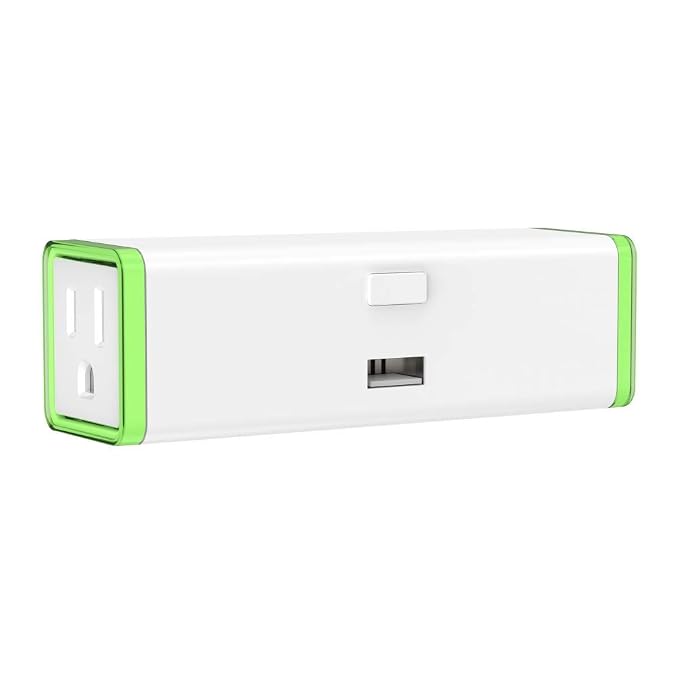
If you have a smart hub to control stuff in your home, such as the thermostat and lights, you enjoy the great ease of controlling from wherever in the world you are and the energy savings and flexibility that come with it (e.g., you can turn your thermostat way up as soon as you leave and return it to a comfortable temperature just before you return, all from your phone). One concern often voiced is: what happens if my hub loses internet connection (and it is the kind that will not flip to a data connection when its wi-fi connection goes down) and I need to re-boot my modem and router? The solution is easy: Put the modem and router on smart plugs and then you can do the re-booting remotely. There's even a 2-outlet smart plug for under $30 from Amazon that is perfect for this. And now for the really great news, especially if your modem and router are not easy to get to: Once connected to this smart plug, you can re-boot from the comfort of any chair inside or outside your house.
Here's the Zooz Z-Wave Plus S2 Double Plug ZEN25:
Monday, July 15, 2019
Quick Way to Restart Outlook Without Rebooting
One known problem with Outlook is when you think you've closed it, it's not actually closed. When you go to shut-down the computer, you will be the choice to force-close it. But if you want to re-open Outlook once you've thought you closed it but it didn't, it won't re-open without re-booting. Actually, there is a quick work-around to enable you to re-open Outlook without re-booting the computer. Here is how:
1. Right click on the Taskbar and click on TaskManager.
2. Click on the Processes tab at the top.
3. Scroll down to Outlook.exe and highlight it.
4. Click on End Process.
Outlook will now open.
Why Trump Will Lose in 2020
While we don't do politics here, we don't shy from political predictions. We have been inundated by emails, phone calls, and texts from sullen loyal readers afraid that Trump will win 2020. We are pleased to state that their frowns should be replaced with smiles and their fears given chase because, barring some black swan political event that no one can foresee, Trump will lose. Before setting out the basis of this conclusion, we stress that this conclusion is NOT based on any of the national polls showing various Dems beating Trump. Presidential elections are NOT national elections. They are state/electoral elections. And that bring us to our conclusion: If the Dem nominee takes Pennsylvania, Michigan, and Wisconsin, Trump loses. Trump won those states by a total of 77,000 votes in suburban counties surrounding the major cities (e.g., Philadelphia, Detroit, Milwaukee). Clinton lost those states because she under-peformed Obama in them by over 600,000 votes. The 2018 congressional elections brought those counties back into (or flipped them into) the Democrats' fold because the demographics came to hate Trump notwithstanding the economy, the stock market, or anything else anyone thinks he did well by. Their antipathy has not changed. So, the bottom-line is this: The Dem does not have to flip any of Trump's base, which has remained static since the day he was elected. All she or he needs to do is marginally okay with the 77,000 and marginally okay in bringing out from the 600,000. I trust those frowns have now been turned upside down.
Google Lens: Really Cool
Google Lens is an AI-powered technology that leverages your smartphone’s camera and deep machine learning to detect objects. Moreover, the system understands what it detects and offers follow-up actions based on what it sees.
Google Lens was unveiled by Google in 2017 and at launch, it was a Pixel-exclusive feature. But since then, the feature has made it to more phones. For example, handsets like the OnePlus 6T come with Google Lens integrated into the camera app. Select models from Sony, LG, Motorola, Nokia, ASUS and more also benefit from this feature. The option is also available in Google Photos and via the Google Assistant. What’s more, Google also offers a standalone Lens app which you can download via the Play Store or iTunes
Here are some things you can do with it.
Easily copy text
Google Lens allows you to copy text in the form of phone numbers, dates, addresses and email addresses, as well as text from the real world.
A lot of people still use business cards and Google Lens will help you save all the info to your address book and beyond. Simply tap on a phone number/address from the camera app and Lens will suggest what to do with the info. For example, it will offer you the option to add the number as new contact/call/text/email or visit the affiliate website (if any).
Want to copy a random piece of text? Point the Lens at it and you’ll be given the option to select the text you want to copy. It’s that simple.
Find similar products
Google Lens easily lets you find similar products. Just snap a photo of something you love (example: your favorite lip scrub) and Lens will immediately suggest alternative products, complete with link. Just tap and buy!
Get quick info about books
The Holiday season is coming, and books make for great presents. So if you find yourself in a bookshop looking at a book trying to decide if your aunt Susan would like it, Google Lens can give you a helping hand.
Simply point the camera at the book cover and you can easily get access to a short summary of the book, reviews and more via a link to a full Google search.
Sure you can always take the classic route. Open your browser and type in the name of the book manually, but the Google Lens way is a lot faster.
Open links
Browsing something on your PC and you want to continue doing so on your smartphone? Use your phone to snap a photo of the address and Google Lens will immediately serve up the link which you can open on your mobile device.
Lens can also recognize links available on any kind of print media including posters and business cards. Just point the camera at it and you’re good to go!
Access review/ratings of restaurants/bars/venues
Point Google Lens towards a café or restaurant (from the inside or outside) and it will show you ratings/reviews of that place. So when you’re not sure whether you should stay or not, Lens has your back.
Identify plants and animals
Google Lens is a fun tool if you’re a nature observer. Snap pictures of plants and animals and the AI-driven system will recognize them for you. Or simply point the camera at images of living things, the effect will be the same.
Discover music
Found some old records around the house that used to belong to your ex, but you can’t identify the name of the band? Snap a picture of the cover and Lens will serve up that info immediately.
Scan QR Codes
Let’s say you’ve spotted a QR Code somewhere and you’re curious to what it may lead. Well, take out your phone and point Google Lens towards it and you’ll find out, instantly.
Add an event to your calendar
You’ve come across a poster around town while talking a stroll for an event you really want to attend. You can easily add it to your calendar by pointed Lens at it.
After the feature will scan the flyer, you will be offered a variety of options including to add the event to your calendar, check the website of the venue or see it in Maps or learn more about the organizer.
Translate signs
Traveling in a foreign country and can’t understand the signs? Google Lens can help you easily translate them. Take a picture and then tap the Translate button to view the translation.
Sunday, July 14, 2019
Mistakes When It Comes to Storing Wine
[Prefatory Note: One great thing about Yellow Tail is you don't have to worry about how to store it. But if you eschew this fabulous wine, then here are some don'ts of wine storage]
When you like wine, it’s easy to buy a bunch of bottles you’re excited to drink but not sure how to store properly. Before you accidentally ruin your tasty collection, here are some important things to know about how wine ages—and how to keep it in great condition when you set it aside.
Mistake 1: Keeping Bottles for Too Long
“It’s a common misconception that all wines improve with age,” notes wine educator Kevin Zraly, author of Windows on the World Complete Wine Course. “In fact, more than 90 percent of all the wines made in the world are meant to be consumed within one year, and less than 1 percent of the world’s wines are meant to be aged for more than five years.” Depending on its type and quality, a wine may lose up to half of its fruitiness within six months of bottling, and its color may fade (reds) or turn brown (whites) if kept for years.
The few wines that benefit from aging have high levels of acidity and/or tannins (the organic compounds that can affect mouthfeel as well as color in wines). Age-worthy wines can include whites like chardonnay and riesling, and reds like cabernet sauvignon, pinot noir, and syrah. To gauge a specific bottle’s aging potential, ask your wine shop proprietor for advice, search for expert insight online, or reach out to the wine’s producer.
The upshot? It’s OK to focus on enjoying wine rather than saving it for posterity. However, you’ll still want to store it properly—even if just for a little while.
Mistake 2: Maintaining a Space That’s Too Hot
Don’t store your wine in a place where the temperature often fluctuates or becomes very warm, such as on the kitchen counter, on top of the refrigerator, or in the laundry room. Heat is a wine’s worst enemy: Temperatures above 70 degrees will quickly age a wine, robbing it of time to develop its best structure and bouquet. Exposure to high temps for even a few hours may “cook” it, resulting in flat aromas and flavors.
Instead, store your wine in a place where the temperature remains cool. Many professionals aim for an ideal storage temperature of 59 degrees, but Guy Davis, owner of Sonoma County’s Davis Family Vineyards and a winemaker since 1995, says there’s some wiggle room for those new to collecting wine: “If someone has a closet, pantry, cellar, or basement that’s air-conditioned to 70 degrees or less, just like the rest of their home, they can for sure get away with storing their wines that way—as long as they don’t intend to keep them for more than a couple of years.”
Mistake 3: Keeping Wine in the Fridge
Don’t store your wine long-term in your household refrigerator. It’s fine there for a couple of months, but the deep chill in your kitchen fridge—generally 35 to 40 degrees—may cause traditional corks to dry out, allowing air to seep into the bottles, oxidize the wine, and make it go bad faster. Chilling a bottle of wine in the freezer isn’t a great idea either, because the liquid can quickly crystallize and expand, pushing out the cork and creating a mess.
When you need to cool a bottle, chill it in a bucket of water and ice; it’ll be ready to serve within 30 minutes. For long-term storage, consider using a dedicated wine fridge that maintains a temperature of 45 to 65 degrees. Red wines don’t need to be chilled as much as whites, rosés, or sparkling wines, so if you’re mainly into one or the other(s), look for a single-zone cooling fridge. If you prefer to store reds and whites together, look for a dual-zone fridge. Ready to get really serious about wine collecting? You may want to invest in a large, refrigerated maturing cabinet.
Mistake 4: Exposing Bottles to Too Much Moisture (or Not Enough)
Don’t store your wine in very damp or very dry conditions. On the dry end of the spectrum is your household fridge, as mentioned above. In a damp basement or cellar that’s prone to mold, excess moisture can cause labels to peel off and even influence the taste of the wine itself. “Mold or mildew could set in on the edge of a bottle’s cork,” says Patrick Callagy, enologist (a scientist who oversees the production of wine) at the Russian River Valley’s Moshin Vineyards. “As you open the bottle and pour it into a glass or decanter, that wine you’d been excited about could now be tainted with flavors of mold or mildew. Tastes like these are called off-flavors, and they’re never good.”
Store your wine long-term at a humidity level around 75 percent. (Tip: Many home thermometers have humidity sensors; look for an inexpensive one that includes this feature.) If your storage space is too dry, place a pan of water in the area and replenish it every few days. If your storage space is too wet, bring in a small dehumidifier and keep close tabs on any changes; the goal here is to decrease moisture, not to create very dry conditions.
Mistake 5: Letting the Sun Hit Your Stash
Don’t store your wine in any spot that receives more than a few minutes of direct sunlight each day. As with your skin, the sun’s UV rays can prematurely age wine. It’s the main reason winemakers tend to use tinted glass bottles.
Instead, store your wine in a place that’s dark most of the time. For lighting when needed, consider using LED bulbs, which convert more of their energy to light than heat (compared with incandescents).
Mistake 6: Setting the Bottles Upright
When storing wine for more than a year, lay any bottle that’s sealed with a traditional cork on its side so the stopper doesn’t dry out. (This tactic is unnecessary for bottles sealed with a screw cap or a glass or plastic cork.)
Mistake 7: Allowing Smelly Neighbors
Don’t store wine near anything with a strong scent. Even though most bottling methods do a good job of keeping air out, the odors of cleaning solvents, paint, garlic, onions, and other powerfully fragrant items may permeate your wines over time.
Mistake 8: Leaving Bottles Open
Few wines stay fresh for longer than a couple of days after opening. To help prolong flavors and aromas, spray a little inert gas (which displaces oxygen) into a partially consumed bottle and immediately re-seal it with the cork or a stopper. Further protect your already opened wine by storing it in your fridge until you’ve finished the bottle. Cheers!
Saturday, July 13, 2019
Resetting Recommendations Made Just for You
[Courtesy of the WSJ]
Personalized recommendations, robotically based on our previous choices, have become a critical part of our digital lives. But you can quickly feel stuck in an echo chamber of your own making, even as your tastes evolve. Netflix’s recommendations-riddled scroll in particular tends to induce déjà vu: Watch “Pulp Fiction” once and you may start seeing John Travolta in your autoplay, on your homepage, across your app and in your nightmares.
“If you start searching for something specific on Netflix, you’ll very quickly realize they don’t actually have that much,” said Jonathan Cohn, author of “The Burden of Choice,” which examines how these algorithms have become central to how we discover new content.
Luckily for you, and that ex who slyly uses your streaming accounts, a clean slate is within reach. It’s possible to tame recommendations on most platforms or wipe them away.
“ ‘The recommendations-riddled scroll on Netflix tends to induce déjà vu.’ ”
Resetting your recommendations is easiest on YouTube, which offers users plenty of agency over content suggestions. If you click on your account tile in the upper-right-hand corner, you can navigate to a page called “Your data in YouTube,” which shows you all the ways recommendations are sourced. Each section—your watch history and search history, videos liked, channel subscriptions, etc.—has a “manage” option where you can erase the data. Result: You’ll clear your recommendations and the homepage list will default to YouTube’s most popular videos. That might not be an improvement. But still: different.
Meanwhile, if Netflix notes that an Adam Sandler flick is your “98% Match,” it might be time to hit reset. Go to the Viewing Activity tab in your Account setting and delete individual films and shows or hit Hide All to start reining in Netflix’s most persistent recommendations.
Still, that’s not the only data Netflix factors in. It also compares your viewing habits to that of similar members and uses data to create tailor-made promo images that entice you to keep bingeing. (Ever wonder why a film’s artwork features a close-up of your favorite actor, though he barely appears in the movie? Netflix knows!)
Your only true way out is to start over. Fortunately, Netflix makes it fairly easy: Head back to your profile tile and click Manage to add a new profile, which you can cultivate for your more adventurous, eclectic alter-ego. Predictive content personalization wouldn’t dare suggest trashy rom-coms to her, right?
Spotify, annoyingly, thwarts the desire to completely clear one’s listening history. To reset your playlists—which can be easily sullied if you let a friend with questionable music taste DJ your party—you’ll have to create a new profile. You can, however, take advantage of Private Session, which is often used to hide an embarrassing listening history from social media friends and isn’t subjected to algorithmic mining. Under your account, hit settings and toggle Private Session on.
Or try Radiooooo, a quirky anti-Spotify app that lets you select a decade, then a country—say, 1980s Russia or 1920s Brazil—then serenades you with a unique blend of tunes without tracking you closely.
When it’s impossible to reset your recommendations, take advantage of built-in ratings systems. Amazon, for example, won’t let you erase your purchase history, but when it shows you a turtleneck you bought months ago, mark it in the “Improve Your Recommendations” tab of your account to avoid seeing it 70 more times. You can also fill out a Wish List to help determine what Amazon nudges you toward.
Meanwhile, Netflix lets you rate shows with a thumbs-up or -down, which seems silly but can have a significant impact on what it recommends. So if your tendency is to click first and regret your choices later, you should circle back to give “The Waterboy” a thumbs down.
You vs. The Professional Investor: Maybe It's a Tie
[Courtesy of the WSJ]
Professional investors hold stocks too long. They react erratically to stock splits. They may even buy one stock when they intended to purchase a different one—almost as often as supposedly clueless individual investors make the same kind of blunder.
What are the worst mistakes you’ve made as an investor? Please join the conversation below.
In a study released this week, Essentia Analytics, a London-based firm that studies portfolio and behavioral data to give investment managers feedback on their decisions, looked at whether professionals sell stocks at the right time.
Analyzing 14 years of data on more than 9,000 round-trip investments, Essentia found that managers held on to stocks well past their peak—reducing the performance contribution from those positions by an average of 0.07% from peak to final sale.
That might not sound like much. But 0.07% is more than twice the total annual expenses of popular exchange-traded index funds from iShares, Charles Schwab and Vanguard Group.
The problem, says Essentia’s head of research, Chris Woodcock, is what psychologists call the “endowment effect.” This is the automatic tendency to put a higher value on what you own than what you don’t—and to become reluctant to part with something merely because it is yours.
Therefore, he says, portfolio managers “put greater focus on positive rather than negative attributes” of the stocks they own. That leads them to minimize potential bad news and to hang on too long.
“ A case of mistaken identity: In 2013, when Twitter Inc. filed for its IPO, Tweeter Home Entertainment Group Inc., a bankrupt electronics retailer, rose 1,800% in a day. ”
Mike Ervolini, chief executive of Cabot Investment Technology, a Boston firm that seeks to help asset managers improve results, says about one-third of the $3.5 trillion in portfolios Cabot has analyzed hold on to winners too long. On average, he says, that impairs returns by about one percentage point annually—although that is “easily reversed” with better feedback on how to refine their process and judgments.
To help counteract the problem, investors can set predetermined price levels—say, a price move of 25%—at which they must re-evaluate a stock. And they should use a blank slate, asking whether they would buy the stock at the latest price if they had never owned a share.
Another new study of investors, large and small, looks at how they respond to news.
Imagine two highly similar firms with the same market capitalization, but one has a greater number of shares trading at a lower price per share. Important information—the hiring of a CEO, the introduction of a product—should move either stock by about the same percentage.
In practice, comparable news turns out to have a bigger impact on stocks with lower share prices. It’s as if investors, instead of thinking in percentage terms, are telling themselves something along the lines of “this news is worth $1 per share.”
Professionals wouldn’t do that. Would they? “Even among firms with extremely high institutional ownership,” says Kelly Shue, a professor of finance at the Yale School of Management and co-author of the study, “the bias is still strong and significant.” That may cause stocks with low share prices to fluctuate more sharply than the facts justify.
Let’s consider another oddity. In April, tiny Zoom Technologies Inc. soared when traders bought its stock instead of Zoom Video Communications Inc., the hot initial public offering they thought they were getting. In 2013, when Twitter Inc. filed for its IPO, Tweeter Home Entertainment Group Inc., a bankrupt electronics retailer, rose 1,800% in a day.
Surely such blunders can be committed only by naive individual investors mashing away on phones or laptops.
Surely you jest.
A new study looks at more than 250 companies with similar names or tickers and estimates that 5% of their total trading volume consists of such cases of mistaken identity. Andrei Nikiforov, co-author of the research and a finance professor at the Rutgers School of Business in Camden, N.J., says he assumed individual investors must be solely responsible.
He was wrong. Sorting the trades by size, and by whether the stock exchange identified them as originating from retail investors, showed that institutions made such trades roughly as often.
Some of that could be deliberate.
Computer-driven trading firms may be detecting a spike in trading volume when naive investors confuse one ticker or stock name for another; the machines then buy the same shares automatically to catch a further rise. Because it takes roughly a week, on average, for such stock prices to revert to normal, mechanically buying on the basis of someone else’s mistake might not be a mistake.
But that may not account for all the mistaken institutional trading, says Prof. Nikiforov. Some professional investors could be buying, say, Helmerich & Payne Inc. (ticker symbol: HP ) thinking they’re getting HP Inc. (ticker: HPQ).
In that case, however rare it might be, a cynical quip from the late Martin Whitman, founder of the Third Avenue funds, might apply: “When you use the word ‘professional’ on Wall Street, it doesn’t mean they know anything. All it means is that they do it for money.”
Subscribe to:
Posts (Atom)